Blog article
How "Redis" Makes ERPNext Faster!!
Discover how Redis significantly improves ERPNext performance by reducing database load, accelerating page rendering, processing background jobs efficiently, and enabling real-time communication.
Page details
- Category: ERPNext
- Tags: ERPNext,Redis
- Published on: 04-08-2026
Content
A technical look at caching, background jobs, and realtime updates in Frappe / ERPNext
Introduction
If your ERPNext feels slow , forms take a second too long to open, dashboards lag, background emails arrive late , the bottleneck is almost certainly not your server hardware or your MariaDB schema. It is the sheer volume of repeated, low-value database queries that ERPNext makes before it even starts executing your business logic.
Every page render in ERPNext triggers dozens of metadata lookups, permission checks, and session queries against MariaDB. At five users this is invisible. At fifty users, these queries pile up, saturate the connection pool, and make the entire system feel sluggish. The fix is not a bigger server. The fix is Redis , and it is already built into every ERPNext installation.
Redis makes ERPNext faster in three distinct, measurable ways: it eliminates redundant database reads through caching, it moves slow background operations off the web request thread, and it delivers realtime updates to the browser without polling. This article walks through each of these mechanisms in detail and shows exactly why a well-configured Redis layer is the single highest-leverage performance change you can make in an ERPNext deployment.
Redis is not optional. When it goes down or runs out of memory, ERPNext does not just get slower , parts of it stop working:
- Every page gets slower immediately: Without the cache, each page render falls back to MariaDB for metadata and permissions on every single request. Response times spike 10 to 50 times under normal load.
- Background jobs stop or get lost: Emails do not send, PDFs do not generate, and scheduled reports do not run. Any jobs queued in memory are lost the next time the server restarts.
- The UI goes static: Progress bars freeze during imports, desk notifications stop arriving, and document locking breaks , because all of that depends on Redis pub/sub to push updates to the browser.
This is why Frappe ships Redis as a required dependency, not an optional add-on. Getting it right is not a nice-to-have , it directly determines how fast and how reliably your ERPNext runs.
Why Redis is So Much Faster Than MariaDB
To understand why Redis makes ERPNext faster, you need to understand what makes Redis fundamentally different from MariaDB at the architecture level , not just "it is in-memory."
When MariaDB receives a query , even a simple primary key lookup , it has to parse the SQL, acquire a query thread, traverse the B-tree index, read data pages from the buffer pool or disk, and return results through the client protocol. Each of those steps takes time. Under concurrent load, multiple queries compete for the same query threads and the same I/O bandwidth. The more users you have, the more those steps overlap and the slower everything gets.
Redis has none of that overhead. It runs on a single-threaded event loop where every command executes atomically in O(1) time directly from RAM. There is no query planner, no index traversal, no disk I/O, no thread contention. A Redis key lookup that would take 15 to 40 milliseconds in MariaDB completes in under 1 millisecond from Redis , every single time, regardless of how many users are active.
This is not a marginal improvement. When ERPNext opens a form and makes 20 to 40 metadata calls, the difference between 15 ms per call (MariaDB) and 0.5 ms per call (Redis) is the difference between a 600ms page load and a 20ms one. Multiply that by every user, every page, every request , and you understand why Redis is the performance backbone of the entire stack.
The Three Redis Roles Inside ERPNext
ERPNext does not use Redis in just one place. The Frappe framework provisions three separate Redis instances, each solving a different performance problem. Together they cover caching, job queuing, and realtime communication , three completely different bottlenecks, all addressed by the same infrastructure component.
| Instance | Port | Config Key | What It Does |
|---|---|---|---|
| Redis Cache | 13000 |
redis_cache |
Stores doctype metadata, session tokens, permission results, and expensive query results so MariaDB never has to compute them twice. |
| Redis Queue | 11000 |
redis_queue |
Holds background jobs , emails, PDFs, imports, ledger recalculations , so they run asynchronously without blocking user-facing requests. |
| Redis SocketIO | 12311 |
redis_socketio |
Acts as the event bus between the Python server and the browser, delivering realtime updates instantly without the browser having to poll. |
3.1 Request Flow Across the Stack
The diagram below shows where each Redis instance intercepts work in the request cycle , each one catching a different category of load before it reaches MariaDB or blocks a web worker.
.png)
Caching: Why Your Forms Load Faster
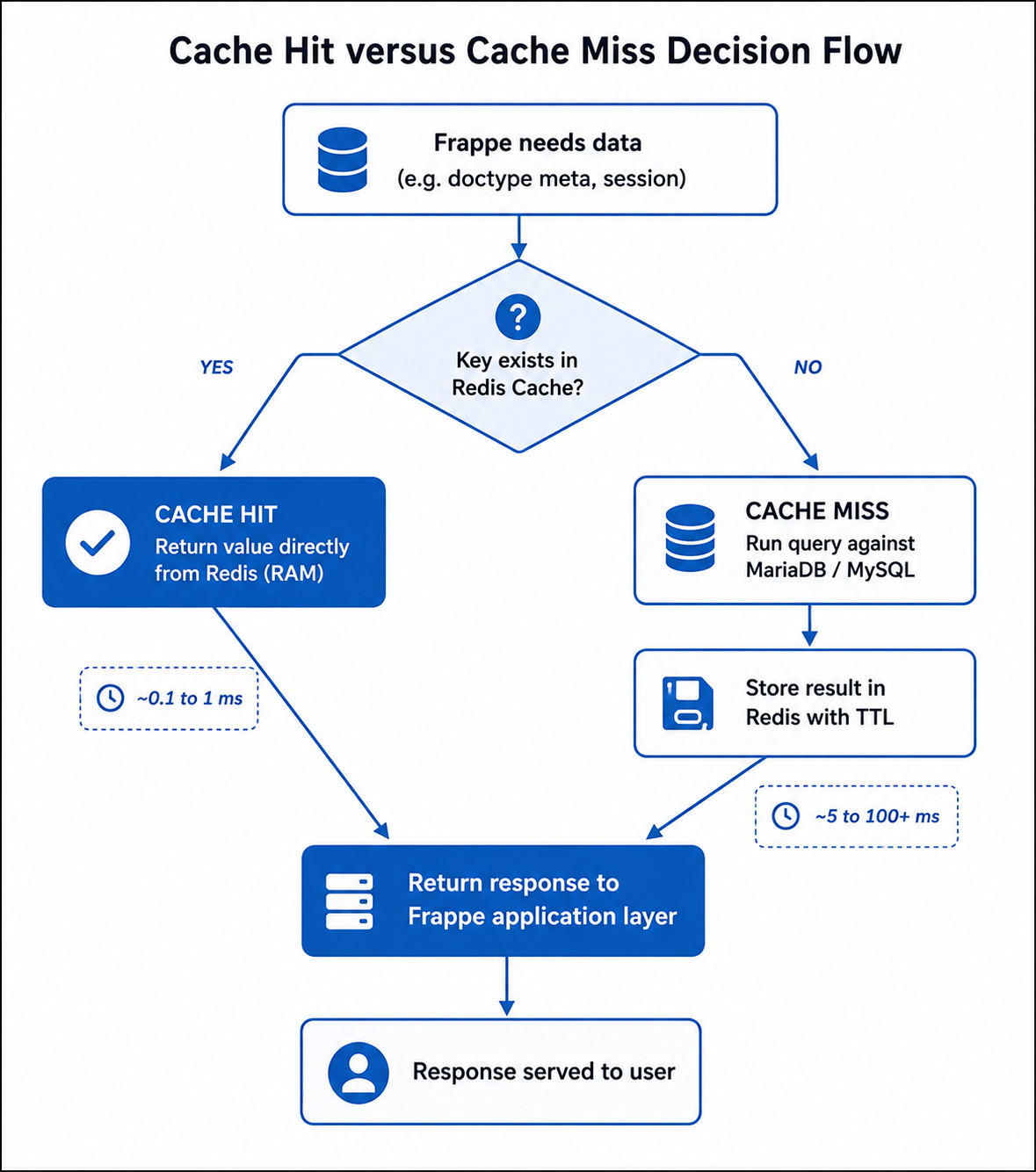
The most immediately noticeable speed improvement Redis delivers is faster page loads , and the reason is caching. When you open any form in ERPNext, Frappe makes dozens of calls to resolve doctype metadata, user permissions, and system settings before rendering a single field. Without Redis, every one of those calls is a fresh MariaDB query. With Redis, they return from RAM in under a millisecond each.
Frappe uses a cache-aside pattern: check Redis first, fall back to MariaDB only on a miss, then write the result back to Redis so the next request never touches the database. After the first user opens a form, every subsequent user gets that form's metadata from cache. The database query happens once. Redis serves it for every request that follows.
4.1 What Gets Cached and Why It Matters
The functions that hit Redis most frequently are exactly the ones ERPNext calls most , on every page, for every user, on every request:
frappe.get_meta(): field definitions for every doctype on the pagefrappe.has_permission(): user permission check per record and doctypefrappe.get_system_settings(): global configuration values- Boot info , the initial desk payload served to the browser on login
- Dashboard chart queries , expensive aggregations served from cache on repeat loads
Each of these costs 15 to 40 ms in MariaDB. Each costs under 1 ms from Redis. On a single page render with 30 such calls, that is the difference between 1,200 ms of database time and 30 ms from cache. That is where your form-load speed comes from.
4.2 Cache API in Practice
Custom apps in ERPNext can plug into the same cache using Frappe's built-in API. The pattern is identical to what Frappe itself uses internally:
cached = frappe.cache().get_value("branch_wise_sales_summary")

if cached is None:
    cached = compute_expensive_sales_summary()
    frappe.cache().set_value(
        "branch_wise_sales_summary",
        cached,
        expires_in_sec=3600
    )

return cached
Any report or custom script that runs the same expensive query repeatedly is a candidate for this pattern. Once cached, the query runs once per hour instead of once per request , and every user who loads that report gets the result in milliseconds.
Background Jobs: Why ERPNext Stays Responsive During Heavy Operations
Have you ever noticed that sending a bulk email campaign or running a large data import does not freeze ERPNext for everyone else? That is Redis Queue at work. Without it, operations like these would execute synchronously inside the same web worker handling your request , blocking it entirely until the task finishes. Every other user waiting for that worker would get no response until the import is done.
With Redis Queue, the web request does one thing: it pushes a job descriptor onto a Redis list and returns immediately. A separate background worker process picks up the job and executes it completely outside the web request lifecycle. The user sees the task start. Other users experience zero slowdown. The operation completes in the background and notifies the user when done.
frappe.enqueue(
    method="myapp.tasks.generate_and_email_report",
    queue="long",
    timeout=1200,
    report_name=report_name,
)
This is what makes it practical to send 10,000 emails, import 100,000 rows, or recalculate a full stock ledger without grinding ERPNext to a halt. The web tier stays free to serve users. The background tier handles the heavy lifting. Redis is the buffer between them that makes this possible.
Because jobs are stored in Redis rather than in process memory, they also survive server restarts , a Gunicorn restart does not wipe the queue. Multiple worker processes on multiple hosts can consume from the same queue, making it easy to scale background processing horizontally without changing any application code.
Realtime Updates: Why the UI Stays Live Without Refreshing
When you run a data import in ERPNext, a progress bar updates in real time. When a background task completes, a notification appears on your desk instantly. When another user opens the same document, you see a live lock indicator. None of this requires you to refresh the page , and none of it would be possible without Redis pub/sub.
ERPNext runs two server-side processes: a Python application server and a Node.js SocketIO server. Your browser holds an open WebSocket connection to the Node.js process. When the Python server needs to push a state change to your browser , task completion, notification, lock event , it cannot reach the WebSocket directly. It publishes an event to a Redis channel using frappe.publish_realtime(). The Node.js server, subscribed to that channel, picks it up and pushes it to your browser immediately.
publish_realtime() → Redis SocketIO Channel → Node.js SocketIO Server → Browser WebSocket
6.1 Why This Matters for Performance
The browser has to ask the server every 1 to 2 seconds , "is the import done yet?" With 50 users doing this simultaneously, that is 1,500 to 3,000 extra HTTP requests per minute hitting Gunicorn workers that are already busy serving real user requests.
The Python worker pushes one event to Redis when each batch completes. Node.js delivers it to the right browser over the already-open WebSocket in under 10 ms. Gunicorn is not involved at all in delivering progress updates.
The Numbers: How Much Faster Does Redis Actually Make ERPNext?
All three Redis roles compound on each other. Caching reduces MariaDB query volume. The job queue reduces web worker saturation. Pub/sub eliminates polling load. The combined effect is that a server with Redis handling 50 concurrent users carries a MariaDB load comparable to 10 to 15 users without it. Here is what that looks like in concrete numbers:
| Metric | Without Redis | With Redis |
|---|---|---|
| MariaDB queries per page render (50-user load) | 40 to 80 queries | 8 to 15 queries |
| Doctype metadata lookup latency | 15 to 40 ms per call | 0.2 to 1 ms per call |
| Permission check latency per record | 5 to 15 ms | under 1 ms |
| Dashboard chart query (repeated) | 200 to 800 ms | 1 to 5 ms from cache |
| Background job impact on web tier | Blocks Gunicorn workers | Fully isolated workers |
| Realtime event delivery | Polling every 1 to 2s | Push in under 10 ms |
Getting the Most Out of Redis: Configuration and Tuning
Redis is already doing most of the work out of the box , but a few configuration choices determine whether it stays fast as your deployment grows. Misconfiguring Redis memory is the most common reason an ERPNext deployment that "has Redis" still feels slow.
8.1 Connection Configuration
Redis endpoints are declared in sites/common_site_config.json. A standard single-server setup:
{
  "redis_cache":        "redis://127.0.0.1:13000",
  "redis_queue":        "redis://127.0.0.1:11000",
  "redis_socketio":     "redis://127.0.0.1:13000",
  "background_workers": 4
}
8.2 How Much RAM to Give Redis
Under-allocating memory is the most common configuration mistake. When Redis runs out of space, it evicts cache entries , and every evicted entry means a request that falls back to MariaDB instead of being served from cache. The more evictions, the slower ERPNext gets.
| Scale | Concurrent Users | Redis RAM | Notes |
|---|---|---|---|
| Small | 1 to 15 | 256 MB | Single company, standard ERPNext modules |
| Medium | 15 to 75 | 512 MB to 1 GB | Multiple companies or heavy custom doctypes |
| Large | 75 to 200+ | 2 GB+ | Consider dedicated Redis host; split cache / queue / socketio |
8.3 Tuning Guidelines
- 01Set
maxmemorywithmaxmemory-policy allkeys-lru. Without this, Redis will consume all available RAM and then start refusing writes. Withallkeys-lru, it gracefully evicts the least recently used entries, keeping the hot cache intact under memory pressure. - 02Set
background_workersto your CPU core count, not higher. Each worker holds a MariaDB connection open. Over-allocating workers saturates the connection pool and slows down both background jobs and web requests at the same time. - 03Keep Redis on the same host or local network as the application server. Redis latency over a LAN is 0.1 to 0.5 ms. Over a WAN it becomes 5 to 50 ms , at which point the speed advantage over MariaDB disappears entirely and you have gained nothing.
- 04Avoid running
FLUSHALLduring peak hours. A full cache clear forces every request to fall back to MariaDB simultaneously, creating a sudden query spike that can saturate the database for several minutes while the cache gradually rebuilds through normal traffic. - 05Track your cache hit rate with
INFO statsviabench redis-console. A healthy ERPNext deployment has a hit rate above 85%. If it drops below 70%, yourmaxmemorylimit is too low and cache entries are being evicted before they can be reused.
FAQs
bench redis-console, then INFO stats. If keyspace_misses is close to or higher than keyspace_hits, the cache is being evicted before entries can be reused. The fix is almost always increasing maxmemory and setting maxmemory-policy allkeys-lru.bench redis-console, then DBSIZE. An active production cache with 50 users typically holds 5,000 to 20,000 keys. A near-zero count during active usage means caching is not working , either the cache is being flushed too aggressively or the eviction policy is discarding entries immediately.INFO memory shows used_memory consistently near maxmemory. At that point the cache, queue, and pub/sub channels are competing for the same memory pool and evicting each other. Moving Redis Cache to a dedicated host with generous memory allocation gives you the biggest performance return.save 900 1 to redis.conf. Do not enable AOF on the Cache instance , cache data is safe to lose on restart, and AOF adds unnecessary disk I/O with no benefit for ephemeral cached data.bench status. Then confirm Redis SocketIO is reachable: redis-cli -p 12311 ping. Verify redis_socketio in common_site_config.json points to the right host and port. If everything looks correct but events are still not arriving, restart the bench with bench restart and check logs/web.error.log for connection errors.Conclusion
Redis makes ERPNext faster in ways that compound on each other. Caching cuts the number of MariaDB queries per page render from 40 to 80 down to 8 to 15. The job queue takes slow operations completely off the web thread so other users never feel them. Pub/sub replaces polling with instant push delivery, eliminating a constant source of background load. Together, these three mechanisms allow a well-configured ERPNext deployment to handle five times the concurrent users on the same hardware , simply because the right work reaches the right system.
If your ERPNext is slow and you have not looked at Redis memory allocation, cache hit rates, or worker configuration yet , start there. It is not the most glamorous infrastructure tuning, but it is consistently the one that makes the biggest visible difference to your users.